Restricted Guest User has Access to Regions
Restricted guest users should have very limited access to the system, in particular, they should not have access to regions.
Problem
If a guest users (both named and unnamed) are not set as Restricted, they can have access to regions. However, if regions are added to a guest user's profile on the User Security page, and then that user is subsequently set to Restricted, he will still have access to the selected regions, even though they won’t display on the User Security page.
Solution
The administrator must remove the user's restriction, delete the region access, and then reset the user as Restricted.
-
Open the Administration Menu page.
-
Under the ADMINISTRATION heading, click Edit a User.
-
Search for and select the name of the user whose security rights should be modified.
-
Remove the restriction by clearing the Restricted check box.

- Click OK to save.
- Click the User Security link.
-
In the Region Settings pane, delete all region access by clicking the Delete buttons.
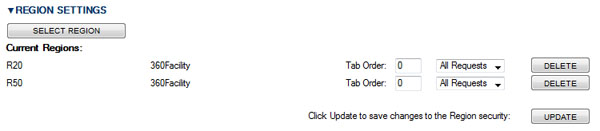
- Click Update.
- Click the Edit User link at the top of the page.
- Re-select the Restricted check box.
- Click OK to save.